Live training for
Run realistic clinical scenarios, live
SimRays is a medical simulation platform where instructors run live patient scenarios and students follow a real-time patient monitor from any device. AI-powered case authoring, DICOM imaging, vital signs, 12-lead ECG, lab results, and defibrillator training - all in one place.
No install, runs in the browser
Real-time synchronization
AI-powered scenario authoring
Features
Everything you need for clinical training
A fully equipped, instructor-controlled simulation experience - from vital signs and DICOM imaging to AI-generated scenarios.
Vitals Monitor
Heart rate, blood pressure, SpO₂, ETCO₂, respiration and temperature with live waveforms, ECG rhythms and clinical alarms.
Laboratory Panel
Publish CBC, biochemistry, blood gas and cardiac markers to the student screen instantly - or define custom parameters.
12-Lead ECG
A 12-lead ECG view synced to the student monitor for realistic diagnostic practice.
DICOM Imaging
View MR/CT studies locally with MPR, measurements and annotations - or share imaging live to student monitors during simulation.
AI Scenario Assistant
Describe a clinical case in natural language and get patient info, multi-stage vital scenarios, lab presets and debrief checklists.
Defibrillator & Pacemaker
Train defibrillation with energy selection, charge, SYNC mode and shock delivery - plus pacemaker rate and output controls.
Debrief & Export Tools
Multi-stage scenario builder, instructor checklists, event logging and PDF/DOCX exports for structured debrief sessions.
Real-time Sessions
Share a short session code and let students join the live monitor in seconds from any device.
Build scenarios in minutes, not hours
Describe a clinical case in plain language and the AI Scenario Assistant generates structured patient data, vital flow scenarios, lab presets and debrief checklists - ready to apply with one click.
Generate full cases with patient info, vital stages, lab values and checklists from a single prompt
Preview AI suggestions before applying - patient, vital scenario, lab preset or all at once
Clinically plausible vitals, ECG rhythms and lab values tailored to your case description
Saved to your scenario library - reuse, edit and share across sessions
AI Scenario Assistant
Ready
Create a 65-year-old patient with inferior STEMI. Generate vital scenario and cardiac lab values.
Scenario ready - patient, 3-stage vital flow and lab preset generated.
Describe a clinical case…
DICOM Viewer
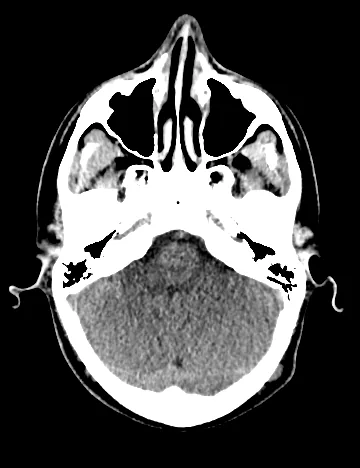
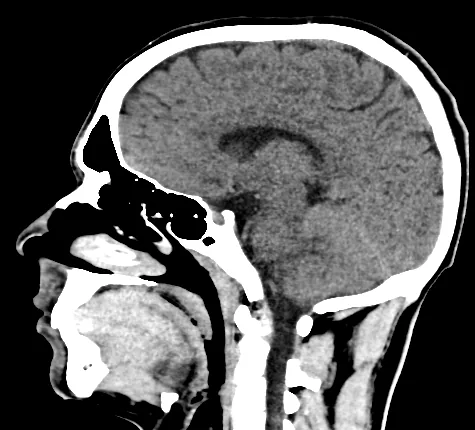
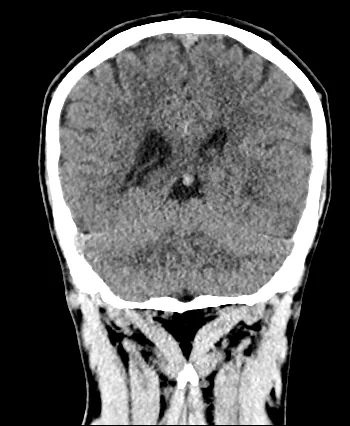
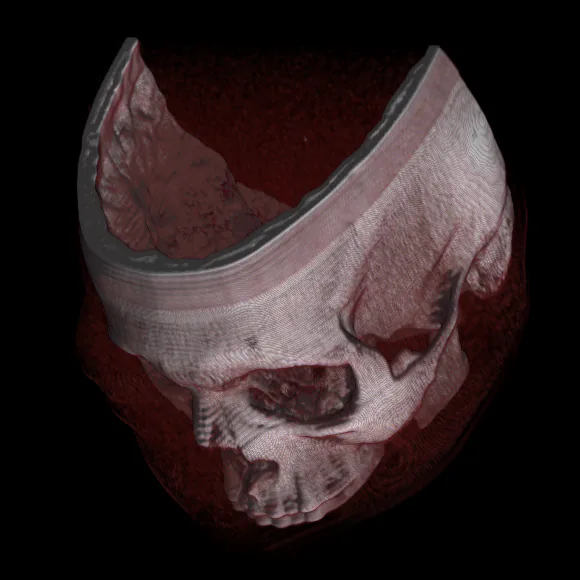
Medical imaging, built in
Open MR/CT examinations locally in your browser or share imaging live with student monitors during simulation - with full privacy and real-time synchronization.
Standalone viewer: open folders or files, MPR (axial/sagittal/coronal), measurements, annotations and cine playback
100% local processing - files never leave your device in standalone mode
Live simulation relay: instructor shares studies to student monitors with synced viewer state and cursor
Session-only relay - imaging data is never stored on the server
Modules
Four specialized modules
Pick the modules you need - each ships with instructor controls and a synchronized student monitor.
Vitals Monitor
Vital signs, waveforms, defibrillator, pacemaker and instructor controls.
Laboratory
Lab parameters, custom values, publishing and the student screen.
12-Lead ECG
12-lead ECG view and synchronized student monitor.
DICOM Viewer
Local MR/CT viewing, MPR, measurements, annotations and live simulation sharing.
A short demo is available for unlicensed users.
How it works
Get started in four steps
No setup, no downloads. Open a session and start teaching.
Create a session
As an instructor, start a simulation session and get an automatically generated short join code.
Build your scenario
Use the AI assistant to generate a case from a description, or build multi-stage scenarios manually with the scenario builder.
Students join
Students enter the code from any device to open the live patient monitor.
Run the simulation
Adjust vital signs, publish labs, share DICOM imaging and drive scenario stages in real time.
Why SimRays
Why SimRays?
Built for healthcare education - realistic, scalable simulation without the setup hassle.
Runs in the browser
No installation required; works instantly on desktop, tablet and phone.
Instructor-controlled
Drive the scenario in real time and every student monitor updates instantly.
AI-powered authoring
Generate complete clinical cases from a description - vitals, labs, checklists included.
Multilingual
Full interface support in 17 languages including Turkish, English, German and Arabic.
Try before you buy
Experience each module with a short demo before purchasing.
Clinical realism
Faithful simulation with real waveforms, rhythms, laboratory values and DICOM imaging.
FAQ
Frequently asked questions
Short answers about how SimRays works, what it costs and how your data is handled.
What is SimRays?
SimRays is a browser-based clinical simulation platform for healthcare education. Instructors run live patient scenarios while students follow a real-time patient monitor on their own devices. It combines a vital signs monitor, 12-lead ECG, laboratory panels, a DICOM viewer, defibrillator and pacemaker training and an AI scenario assistant.
Who is SimRays for?
SimRays is built for healthcare education: instructors and students in medicine, nursing, paramedic and emergency care programs, and simulation centers that want to run patient monitor scenarios on the laptops, tablets and phones they already have.
Do I need to install anything?
No. SimRays runs in a modern web browser on desktop computers, tablets and phones. Neither instructors nor students need to download or install anything.
How do students join a simulation?
The instructor starts a session and receives a short join code. Students select "Join session" on simrays.com and enter the code; no account is needed. Every change the instructor makes, such as vital signs, ECG rhythm, lab results or imaging, appears on all student monitors in real time.
Is SimRays free? How much does it cost?
Creating an account is free, and each module (Vitals Monitor, Laboratory, 12-Lead ECG and DICOM Viewer) has a short demo for unlicensed users. Full access is a yearly subscription per module, priced in euros. Subscriptions renew after one year unless you turn off automatic renewal, which you can do at any time. Current prices are listed on the "My subscriptions" page after you sign in.
What does the AI Scenario Assistant do?
You describe a clinical case in plain language, for example a 65-year-old patient with an inferior STEMI, and the assistant generates patient information, a multi-stage vital signs scenario, laboratory values and a debrief checklist. You preview the suggestions, apply them with one click and keep them in your scenario library for later sessions.
Are DICOM images uploaded to SimRays servers?
No. In the standalone DICOM viewer, MR and CT studies are processed locally in your browser and never leave your device. During a live session the instructor can relay a study to student monitors; the relay lasts only for that session and the imaging data is not stored on the server.
Which vital signs and clinical tools are included?
The monitor shows heart rate, non-invasive blood pressure, SpO₂, EtCO₂, respiratory rate and temperature with live waveforms, ECG rhythms and clinical alarms. It also includes a synchronized 12-lead ECG view, a defibrillator with energy selection, charging, SYNC mode and shock delivery, pacemaker rate and output controls, laboratory panels (CBC, biochemistry, blood gas, cardiac markers and custom parameters), and instructor checklists with an event log and PDF/DOCX export for debriefing.
Which languages does SimRays support?
The full interface is available in 17 languages: English, German, French, Spanish, Portuguese, Italian, Turkish, Dutch, Polish, Romanian, Arabic, Simplified Chinese, Japanese, Korean, Russian, Vietnamese and Thai.
Ready to bring your simulations to life?
Create a free account and run your first live scenario in minutes.
Get started free